Introduction
**This manual is a work in progress so there may be some missing features or rough wording but it should improve over time**
Accidental Synthesizer (AccSyn) is a standalone four‑oscillator Monosynth desktop app for macOS.
It is designed to provide enough standard synth features to be usable for standard synth duties while leaving room open for me to experiment and let it get weird as it evolves.
Hopefully it helps you get weird too.
Getting Started
Requirements
AccSyn is a macOS application. A MIDI keyboard or controller is recommended but not required — you can trigger notes via MIDI from a DAW or other software.
You can download the release binaries for Apple Silicon Mac's. They are unsigned so you will have to do the dance with Apple security setting to get it running.
To build AccSyn yourself you will need to setup a rust development chain as per: Rustup or Rust's Getting started Page
Installation
Build from source using Cargo:
cargo build --release
The compiled binary is at target/release/accidental-synth. You can run it directly or copy it somewhere in your shell path.
First Launch
On first launch AccSyn creates its user patch directory at:
~/Library/Application Support/AccidentalSynthesizer/patches/
Any patches you save in the UI will live here. You can modify or even create your own patches from scratch in this folder. This directory is scanned when the application starts and your patches will appear at the end of the patches dropdown list at the top center of the application.
Audio Setup
Open the Settings panel and select the Audio Settings section. Choose your output device, left/right channels, sample rate, and buffer size. Changes take effect immediately.
A lower buffer size gives less latency at the cost of higher CPU load. If you hear clicks or dropouts, increase the buffer size.
MIDI Setup
AccSyn creates a virtual MIDI input port named AccSyn MIDI Input that appears in CoreMIDI automatically. Any DAW or MIDI software on your Mac can send MIDI to it.
You can also choose a hardware or software MIDI device to listen to for MIDI messages. In Settings → MIDI Settings, select your input port and optionally restrict AccSyn to a specific MIDI channel (it responds to all channels by default).
You can actually use both midi mechanisms at the same time. You might for example choose a device to listen to for MIDI clock but point a midi controller at the Virtual Port for MIDI notes and CC. This could cause weird issues if you get crazy with it but it has been useful for me. Both methods share the same channel number selected in the settings menu.
Playing AccSyn
Once audio and MIDI are configured, you can use it like any monophonic soft synth. It responds to MIDI note on & off, CC, Mod Wheel, monophonic aftertouch/channel pressure, etc. See the MIDI Implementation section for all the details.
Loading Patches
The patch dropdown in the header selects the active patch. Factory patches are listed first (prefixed with *), followed by your saved user patches in alphabetical order. You can send MIDI Program Control messages to change patches. There is only one Bank and it ignores it anyway so don't worry about it. The number next to the patch name in the Patches dropdown is the Program Control number to send for that patch.
Interface Overview
The interface has two main tabs and a settings panel:
- Synth tab — oscillators, filter, envelopes, LFOs, mixer, and performance options
- Effects tab — all effects slots processed in series after the synth signal chain
- Settings — audio device, MIDI device, synth options, and patch management
See the Controls section for a full description of every control, and Settings Menu for the settings panel.
Controls
There are 3 sections to the UI. The Synth and Effects Tabs and the Settings Menu.
The main Synth tab contains all controls for the synth voices, the mixer, and the performance controls like Mod Wheel and Pitch Bend parameters.
The Effects tab contains all the effects modules and sit in the over all signal chain between everything in the Synth panel, with the exception of the output mixer, and the final audio output. The effects are laid out in order of signal flow starting from the top left and proceeding effect to effect. The last effect in a row then goes to the first (left most) effect in the next row down.
The Settings Menu has is own page here
Most controls should reset to the defaults for the patch you selected, or the init patch if you haven't, when you double click them.
Synth Tab
Oscillators
AccSyn has four oscillators: Sub Oscillator, Oscillator 1, Oscillator 2, and Oscillator 3. They are identical except that the sub oscillator is pitched 1 octave below the played note.
| Control | Description |
|---|---|
| Wave Shape | Selects the waveform. See the Waveforms section below. |
| Coarse Tune | Pitch offset in semitones (−12 to +12). |
| Fine Tune | Pitch offset in cents (−63 to +63). |
| Boost | Per Osillator Clipper output boost (0–30db). Adds harmonic content and dirt before the signal reaches the mixer. |
| Pitch Envelope Amount | Determines maximum pitch above or below the fundamental that the envelope controls. +/- 1 octave |
| Shape Parameter 1 | Waveform dependent.See the Waveforms section below. |
| Shape Parameter 2 | Waveform dependent. See the Waveforms section below. |
Waveforms
| Index | Name | Shape Parameter 1 | Shape Parameter 2 | Notes |
|---|---|---|---|---|
| 0 | Sine | N/A | N/A | |
| 1 | Triangle | N/A | N/A | |
| 2 | Square | N/A | N/A | |
| 3 | Saw | N/A | N/A | Rising sawtooth wave |
| 4 | Pulse | Pulse Width | N/A | Width adjustable pulse |
| 5 | Ramp | N/A | N/A | Falling sawtooth wave |
| 6 | Supersaw | Detune | N/A | 7 detunes Sawtooth waves |
| 7 | AM/RM | Modulation Amount | Ring Mod Amount | Morph between AM & Ring Mod |
| 8 | FM | Modulation Amount | Ratio | Bare Bones 2 Op FM |
| 9 | PM | Modulation Amount | N/A | Phase Modulation |
| 10 | Broken | How Broken? | N/A | Sort of self explanitory |
| 11 | Noise | N/A | N/A | N/A |
Filter
A resonant lowpass filter placed after the oscillator mix.
| Control | Description |
|---|---|
| Cutoff | Filter cutoff frequency in Hz. |
| Resonance | Resonance (peak) at the cutoff frequency. |
| Poles | Filter slope: 1–4 poles (6, 12, 18, or 24 dB/octave). |
| Key Tracking | Positive and negative key tracking. See note. |
| EG Amount | How much the Filter Envelope modulates the cutoff. |
| LFO Amount | How much the Filter LFO modulates the cutoff. |
Filter Key Tracking Note - The value is bipolar. The key tracking centers around E4/MIDI note 64 which will always get the filter value you set with cutoff and then notes above or below are altered as you change the key tracking. In the middle there is no tracking, To the right you get normal key tracking where the filter opens up as you play higher notes. To the left you get negative key tracking where the higher notes get darker and the lower notes get brighter.
Filter Envelope
An ADSR envelope dedicated to filter cutoff modulation. An ADSR envelope to modulate the cutoff of the filter over time with the played note. The inverted mode flips the envelope so that the filter starts at maximum cutoff frequency (full brightness) and then the envelope lowers the cutoff and brings it back to full based on how you set it.
Due to the interaction of the filter envelope sustain and the need for there to be somewhere for the cutoff to go I suggest starting with the cutoff either all the way off, or maybe in the center and tune by ear from there.
| Control | Description |
|---|---|
| Atk | Attack time in milliseconds. |
| Dec | Decay time in milliseconds. |
| Sus | Sustain level (0.0–1.0). |
| Rel | Release time in milliseconds. |
| Inverted | Inverts the envelope shape |
Filter LFO
A dedicated LFO for filter cutoff modulation
The LFO modulates the cutoff around (above and below) the current frequency set by cutoff slider. It also follows the cut off value produced by the Filter Envelope value so using both can produce some interesting effects.
| Control | Description |
|---|---|
| Frequency | LFO rate in Hz (or in beat intervals when Clock Sync is enabled. |
| Wave Shape | LFO waveform (same options as oscillators). |
| Phase | Adjust the phase of the LFO in real time (0 to 360 degrees) |
| Clock Sync | Syncs the LFO rate to incoming MIDI clock pulses |
| Key Sync | Syncs the LFO rate to each midi note on event. Can be combined with Clock Sync |
Amp Envelope
An ADSR envelope to modulate the amplitude of the played notes over time. The inverted mode flips the envelope so that the note starts at maximum amplitude and then the envelope lowers the amplitude and brings it back to full based on how you set it.
| Control | Description |
|---|---|
| Atk | Attack time in milliseconds. |
| Dec | Decay time in milliseconds. |
| Sus | Sustain level (0.0–1.0). |
| Rel | Release time in milliseconds. |
| Inverted | Inverts the envelope — amplitude starts at full and decreases on attack. |
Pitch Envelope
An ADSR envelope that modulates oscillator pitch. Each oscillator has a Pitch Envelope Amount control that determines how much it is affected.
| Control | Description |
|---|---|
| Atk | Attack time in milliseconds. |
| Dec | Decay time in milliseconds. |
| Sus | Sustain level (0.0–1.0). |
| Rel | Release time in milliseconds. |
Mixer
Controls the level, stereo position, and mute state for each oscillator and for the master output.
Per-Oscillator (Sub, Osc 1, Osc 2, Osc 3)
| Control | Description |
|---|---|
| Level | Oscillator output level (0.0–1.0). |
| Balance | Stereo pan (left = −1.0, center = 0, right = 1.0). |
| Mute | Silences this oscillator without changing its level setting. |
Output
| Control | Description |
|---|---|
| Level | Master output level (0.0–1.0). |
| Balance | Master stereo pan. |
| Mute | Silences all output. |
Oscillator Options
Global and per-oscillator performance settings.
| Control | Description |
|---|---|
| Portamento | Enables pitch glide between notes. The UI controls all oscillators together; per-oscillator values can be set manually in patch files. |
| Time | Portamento glide duration. |
| Hard Sync | Syncs oscillator 2's phase to oscillator 1, producing hard sync effect. |
| Key Sync | Resets the oscillator phase on each note-on. Useful for consistent attack transients. |
| Pitch Bend Range | Maximum pitch bend in semitones (2–12). |
| Velocity Curve | Shapes how MIDI velocity maps to amplitude. 0.5 is linear; lower values compress dynamics; higher values expand them. |
| Polarity | Inverts the polarity of the output signal. Usually not audible on its own; useful when AccSyn is combined with another signal source and phase cancellation occurs. |
| Sustain | Sustain pedal state (mirrors MIDI CC 64). |
Modulation (Mod) Wheel
The midi mod wheel parameter CC#1 controls the range parameter of a dedicated LFO which controls the depth/amount of the effect on the oscillators.
With some exceptions noted in this table that LFO is applied to the pitch of the oscillator producing a Vibrator effect. Here is the effect it has on each oscillator.
| Waveshape | Target | Effect Produced |
|---|---|---|
| Sine | Frequency | Vibrato |
| Triangle | Frequency | Vibrato |
| Square | Frequency | Vibrato |
| Ramp | Frequency | Vibrato |
| Supersaw | Frequency | Vibrato |
| AM/RM | Modulator Frequency | Ghostly Overtone Vibrato |
| FM | Modulator Frequency | Basic 3rd Operator. Modwheel -> Modulator -> Carrier |
| PM | Frequency | Pulsing effect that changes speed in time to the LFO |
| Broken | Frequency | Vibrato |
| Noise | N/A | N/A |
The Mod Wheel control section has the following controls for the underlying Mod Wheel LFO
| Control | Description |
|---|---|
| Frequency | The LFO's rate in Hz or clock divisions if clock synced |
| Wave Shape | Wave shape for the LFO |
| Phase | Set the current phase of the LFO. Manually sync to other sounds |
| Clock Sync | Syncs LFO rate to MIDI clock |
| Key Sync | Reset the LFO on each key press. Works with or without Clock Sync |
Effects Tab
All effects are applied in series after the synthesizer signal chain. Each has an Enable toggle. Disabled effects pass audio through unchanged.
1 — Saturation
Adds harmonic distortion.
| Control | Description |
|---|---|
| Type | Saturation algorithm. |
| Amount | Drive amount. |
| Post Saturation Gain Cut | Level trim after saturation to compensate for volume increase. |
2 — Colour Compressor
Dynamics compression with a colored character.
| Control | Description |
|---|---|
| Threshold | Level above which compression is applied. |
| Ratio | Compression ratio. |
| Makeup Gain | Output gain to compensate for gain reduction. |
| Blend | Wet/Dry signal blend (Left: 0% Wet, Right: 100% Wet) |
3 — Wave Folder
Folds the waveform back on itself, adding upper harmonics.
| Control | Description |
|---|---|
| Fold Amount | Folding depth applied to positive samples. |
| Asymmetrical | When enabled, positive and negative samples are folded independently. |
| Negative Fold Amount | Folding depth for negative samples (active in Asymmetrical mode). |
4 — Bit Shifter
Reduces bit depth for lo-fi aliasing and quantization noise.
| Control | Description |
|---|---|
| Bit Reduction | Amount of bit depth reduction. Higher = more lo-fi. |
| Blend | Wet/Dry signal blend (Left: 0% Wet, Right: 100% Wet) |
5 — Clipper
Hard clips the signal, adding aggressive saturation at high levels.
| Control | Description |
|---|---|
| Threshold | Clip threshold. |
| Pre-Clip Boost | Gain added before clipping to push more of the signal into saturation. |
| Post-Clip Makeup Gain | Output level trim after clipping. |
| Notch | Clips the value to 0 rather than to the threshold for more extreme distortion. |
6 — Gate Clipping
| Control | Description |
|---|---|
| Threshold | Level below which the gate closes. |
| Pre-Gate Cut | Attenuates signal before the gate. |
| Post-Gate Makeup Gain | Amplifies signal after the gate opens. |
| Notch | Clips the value to 0 rather than to the threshold for more extreme distortion. |
7 — Wave Rectifier
Flips or removes negative samples, changing the waveform symmetry and adding harmonics.
| Control | Description |
|---|---|
| Half Wave / Full Wave | Half Wave removes negative samples; Full Wave flips them to positive. |
| Blend | Wet/Dry signal blend (Left: 0% Wet, Right: 100% Wet) |
8 — Chorus
2 voice chorus effect
| Control | Description |
|---|---|
| Depth | The depth of the chorusing effect |
| Rate | Speed of the modulation |
| Feedback | How much of the wet signal is fed back into the delay buffer |
| Blend | Wet/Dry signal blend (Left: 0% Wet, Right: 100% Wet) |
9 — Flanger
Flanger effect
| Control | Description |
|---|---|
| Depth | The depth of the flanger effect |
| Rate | Speed of the modulation |
| Feedback | How much of the wet signal is fed back into the delay buffer |
| Blend | Wet/Dry signal blend (Left: 0% Wet, Right: 100% Wet) |
10 — Auto Pan
Automatically pans the signal between left and right.
| Control | Description |
|---|---|
| Rate | Panning speed. |
| Width | Maximum pan amount. |
| Wave Shape | LFO shape driving the panning movement. |
11 — Tremolo
Modulates the output amplitude.
| Control | Description |
|---|---|
| Rate | Tremolo speed. |
| Depth | Tremolo intensity. |
| Wave Shape | LFO shape driving the amplitude modulation. |
12 — Delay
A simple stereo delay.
| Control | Description |
|---|---|
| Amount | Wet delay level. |
| Time | Delay time. |
| Feedback | Amount of delay output fed back into the input. |
Signal Flow
How a note travels through AccSyn, from MIDI in to audio out. AccSyn is monophonic, so there is a single signal path — no voice allocation. Note that the oscillator mixer comes before the amplifier and filter.
Click the diagram to open it full size.
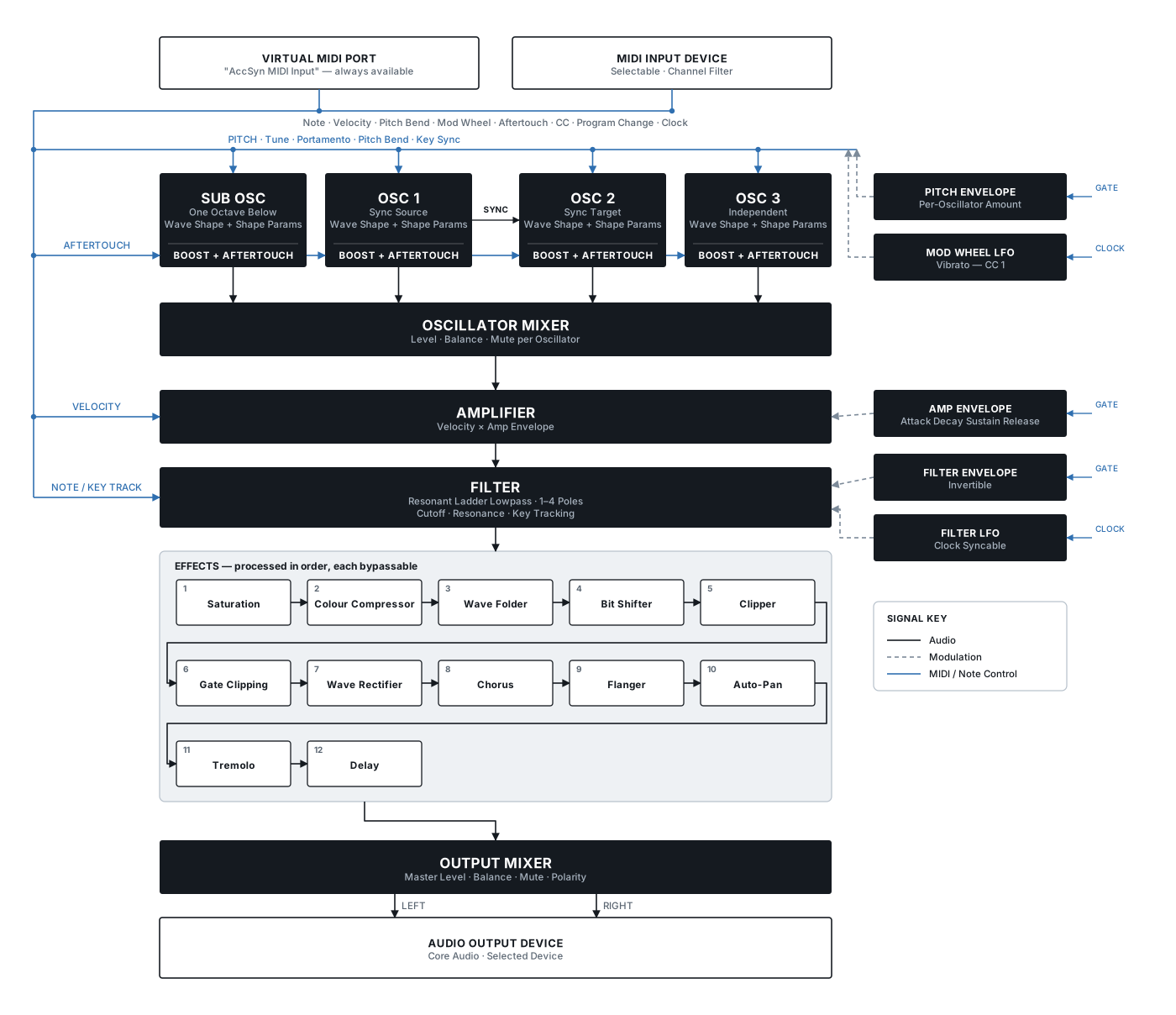
The effects are laid out in the same three rows as the Effects tab, and they process in that order — left to right, top to bottom. For what each control does, see Controls.
Settings Menu
Audio Settings
| Setting | Description |
|---|---|
| Output Device | The audio output device AccSyn will use. Changes take effect immediately. |
| Left Channel | Which output channel carries the left stereo signal. |
| Right Channel | Which output channel carries the right stereo signal. |
| Sample Rate | Audio sample rate in Hz. Higher rates give more high-frequency headroom at the cost of CPU. |
| Buffer Size | Audio buffer size in samples. Smaller buffers reduce latency; larger buffers reduce the risk of dropouts. |
To record AccSyn in your DAW either send it through audio loopback software or do what I do and assign it to a stereo pair of output channels on your audio interface and patch them back to a stereo pair of input channels. Then you can treat AccSyn like a hardware synth and route it through outboard effects, a mixer, or what ever else you do with your synths.
MIDI Settings
| Setting | Description |
|---|---|
| Input Port | The MIDI input device AccSyn listens to. AccSyn also creates a virtual port named AccSyn MIDI Input that is always available. MIDI devices can be changed at any time without restarting. |
| Channel | The MIDI channel AccSyn responds to. Defaults to Omni (all channels). Set to a specific channel (1–16) to ignore messages on other channels. The Input port and the Virtual Port share the same channel setting. |
To prevent needing to use MIDI loop back software to connect to AccSyn from you DAW you can simply point it at the AccSyn virtual port. This port is available no matter what you have chosen for the Input port. The two can also be used simultaneously if you wanted to say send notes to one and CC or clock to the other.
Synth Options
Polarity
This option swaps the polarity of the waveform the synth outputs. It is a simple polarity inversion at the very end of the signal chain. The change will not be audible unless you are getting some kind of interference with another signal's phase/polarity.
If you find that you are getting some kind of cancelation or destructive interference, say with a bass patch and your kick, you can try swapping the polarity. It shouldn't be needed most of the time but if you aren't using a DAW where you can do the polarity swap this might come in handy in certain circumstances.
User Patches
In this section you are able to save the current state of the Synth And Effects controls as a user patch. You can also delete previously saved patches. See the Patch Format section for full details on patches.
Save a Patch
This allows you to save the current state of the Synth and Effects tabs. The settings menu state is not saved in patches. Files will be saved using the name provided. Patch names can be a maximum of 24 characters long. The patch name is used for the file name so some character restrictions apply. Names can include upper and lower case letters (including some accented characters), spaces, numbers, as well as most special characters.
Delete a Patch
Choose the patch to be deleted and press delete. WARNING!: This CAN NOT be undone.
MIDI Implementation Chart v2.0
Manufacturer: Dave White Model: Accidental Synthesizer (AccSyn) Version: v2026.07.13.520 Date: 2026-07-15
Basic Information, MIDI Timing & Synchronization, and Extensions Compatibility
| Function | Transmitted/Export | Recognized/Import | Remarks |
|---|---|---|---|
| 1. Basic Information | |||
| MIDI channels | No | 1-16 | Omni mode by default, configurable via UI |
| Note numbers | No | 0-127 | Full MIDI range |
| Program change | No | Yes | Program numbers corespond to the order patches appear in the Patches dropdown menu. Presets and then user patches all in 1 bank |
| Bank Select response? | No | No | |
| Modes supported: | |||
| Mode 1: Omni-On, Poly | No | No | Mono synth |
| Mode 2: Omni-On, Mono | No | Yes | Default mode |
| Mode 3: Omni-Off, Poly | No | No | Mono synth |
| Mode 4: Omni-Off, Mono | No | Yes | User-selectable |
| Multi Mode | No | No | |
| Note-On Velocity | No | Yes | |
| Note-Off Velocity | No | No | |
| Channel Aftertouch | No | Yes | Controls oscillator clipper boost |
| Poly (Key) Aftertouch | No | No | |
| Pitch Bend | No | Yes | |
| Active Sensing | No | No | |
| System Reset | No | Yes | |
| Tune Request | No | No | |
| Universal System Exclusive: | |||
| Sample Dump Standard | No | No | |
| Device Inquiry | No | No | |
| File Dump | No | No | |
| MIDI Tuning | No | No | |
| Master Volume | No | Yes | |
| Master Balance | No | Yes | |
| Notation Information | No | No | |
| Turn GM1 System On | No | No | |
| Turn GM2 System On | No | No | |
| Turn GM System Off | No | No | |
| DLS-1 | No | No | |
| File Reference | No | No | |
| Controller Destination | No | No | |
| Key-based Instrument Ctrl | No | No | |
| Master Fine/Coarse Tune | No | No | |
| Other Universal System Exclusive | No | No | |
| Manufacturer or Non-Commercial System Exclusive | No | No | |
| NRPNs | No | No | |
| RPNs: | |||
| RPN 00 (Pitch Bend Sensitivity) | No | No | Use CC #5 instead |
| RPN 01 (Channel Fine Tune) | No | No | |
| RPN 02 (Channel Coarse Tune) | No | No | |
| RPN 03 (Tuning Program Select) | No | No | |
| RPN 04 (Tuning Bank Select) | No | No | |
| RPN 05 (Modulation Depth Range) | No | No | |
| 2. MIDI Timing and Synchronization | |||
| MIDI Clock | No | Yes | |
| Song Position Pointer | No | No | |
| Song Select | No | No | |
| Start | No | No | |
| Continue | No | No | |
| Stop | No | Yes | |
| MIDI Time Code | No | No | |
| MIDI Machine Control | No | No | |
| MIDI Show Control | No | No | |
| 3. Extensions Compatibility | |||
| General MIDI compatible? | No | No | Dedicated synthesizer |
| Is GM default power-up mode? | No | No | |
| DLS compatible? | No | No | |
| (DLS File Types) | No | No | |
| Standard MIDI Files | No | No | |
| XMF Files | No | No | |
| SP-MIDI compatible? | No | No |
Control Number Information
| Control # | Function | Transmitted (Y/N) | Recognized (Y/N) | Remarks |
|---|---|---|---|---|
| 0 | Bank Select (MSB) | N | N | |
| 1 | Modulation Wheel (MSB) | N | Y | Controls Pitch Modulation LFO depth |
| 2 | Breath Controller (MSB) | N | N | |
| 3 | Velocity Curve | N | Y | |
| 4 | Foot Controller (MSB) | N | N | |
| 5 | Pitch Bend Range | N | Y | |
| 6 | N | N | ||
| 7 | Master Volume | N | Y | |
| 8 | Mute | N | Y | |
| 9 | N | N | ||
| 10 | Stereo Balance | N | Y | |
| 11 | N | N | ||
| 12 | Sub Oscillator Shape Parameter 1 | N | Y | |
| 13 | Sub Oscillator Shape Parameter 2 | N | Y | |
| 14 | Oscillator 1 Shape Parameter 1 | N | Y | |
| 15 | Oscillator 1 Shape Parameter 2 | N | Y | |
| 16 | Oscillator 2 Shape Parameter 1 | N | Y | |
| 17 | Oscillator 2 Shape Parameter 2 | N | Y | |
| 18 | Oscillator 3 Shape Parameter 1 | N | Y | |
| 19 | Oscillator 3 Shape Parameter 2 | N | Y | |
| 20 | Oscillator Key Sync Enabled | N | Y | |
| 21 | Sub Oscillator Pitch Envelope Amount | N | Y | |
| 22 | Oscillator 1 Pitch Envelope Amount | N | Y | |
| 23 | Oscillator 2 Pitch Envelope Amount | N | Y | |
| 24 | Oscillator 3 Pitch Envelope Amount | N | Y | |
| 25 | Pitch Envelope Attack Time | N | Y | |
| 26 | Pitch Envelope Decay Time | N | Y | |
| 27 | Pitch Envelope Sustain Level | N | Y | |
| 28 | Pitch Envelope Release Time | N | Y | |
| 29 | Pitch Envelope Inverted | N | Y | |
| 30 | N | N | ||
| 31 | N | N | ||
| 32 | N | N | ||
| 33 | N | N | ||
| 34 | N | N | ||
| 35 | N | N | ||
| 36 | N | N | ||
| 37 | Portamento Time | N | Y | |
| 38 | Oscillator Hard Sync | N | Y | |
| 39 | Channel Volume (LSB) | N | N | |
| 40 | Sub Oscillator Shape | N | Y | |
| 41 | Oscillator 1 Shape | N | Y | |
| 42 | Oscillator 2 Shape | N | Y | |
| 43 | Oscillator 3 Shape | N | Y | |
| 44 | Sub Oscillator Coarse Tune | N | Y | |
| 45 | Oscillator 1 Coarse Tune | N | Y | |
| 46 | Oscillator 2 Coarse Tune | N | Y | |
| 47 | Oscillator 3 Coarse Tune | N | Y | |
| 48 | Sub Oscillator Fine Tune | N | Y | |
| 49 | Oscillator 1 Fine Tune | N | Y | |
| 50 | Oscillator 2 Fine Tune | N | Y | |
| 51 | Oscillator 3 Fine Tune | N | Y | |
| 52 | Sub Oscillator Level | N | Y | |
| 53 | Oscillator 1 Level | N | Y | |
| 54 | Oscillator 2 Level | N | Y | |
| 55 | Oscillator 3 Level | N | Y | |
| 56 | Sub Oscillator Mute | N | Y | |
| 57 | Oscillator 1 Mute | N | Y | |
| 58 | Oscillator 2 Mute | N | Y | |
| 59 | Oscillator 3 Mute | N | Y | |
| 60 | Sub Oscillator Balance | N | Y | |
| 61 | Oscillator 1 Balance | N | Y | |
| 62 | Oscillator 2 Balance | N | Y | |
| 63 | Oscillator 3 Balance | N | Y | |
| 64 | Sustain Pedal | N | Y | |
| 65 | Portamento On/Off | N | Y | |
| 66 | Sub Oscillator Clip Boost | N | Y | |
| 67 | Oscillator 1 Clip Boost | N | Y | |
| 68 | Oscillator 2 Clip Boost | N | Y | |
| 69 | Oscillator 3 Clip Boost | N | Y | |
| 70 | Filter Poles | N | Y | |
| 71 | Filter Resonance | N | Y | |
| 72 | Amp Envelope Release Time | N | Y | |
| 73 | Amp Envelope Attack Time | N | Y | |
| 74 | Filter Cutoff | N | Y | |
| 75 | Amp Envelope Decay Time | N | Y | |
| 76 | N | N | ||
| 77 | N | N | ||
| 78 | N | N | ||
| 79 | Amp Envelope Sustain Level | N | Y | |
| 80 | Amp Envelope Inverted | N | Y | |
| 81 | N | N | ||
| 82 | N | N | ||
| 83 | N | N | ||
| 84 | N | N | ||
| 85 | Filter Envelope Attack Time | N | Y | |
| 86 | Filter Envelope Decay Time | N | Y | |
| 87 | Filter Envelope Sustain Level | N | Y | |
| 88 | Filter Envelope Release Time | N | Y | |
| 89 | Filter Envelope Inverted | N | Y | |
| 90 | Filter Envelope Amount | N | Y | |
| 91 | Key Tracking Amount | N | Y | |
| 92 | N | N | ||
| 93 | N | N | ||
| 94 | N | N | ||
| 95 | N | N | ||
| 96 | N | N | ||
| 97 | N | N | ||
| 98 | N | N | ||
| 99 | N | N | ||
| 100 | Mod Wheel LFO Key Sync | N | Y | |
| 101 | Mod Wheel LFO Clock Sync | N | Y | |
| 102 | Mod Wheel LFO Frequency | N | Y | |
| 103 | Mod Wheel LFO Center Value | N | Y | |
| 104 | Mod Wheel LFO Range | N | Y | |
| 105 | Mod Wheel LFO Wave Shape | N | Y | |
| 106 | Mod Wheel LFO Phase | N | Y | |
| 107 | Mod Wheel LFO Reset | N | Y | |
| 108 | Filter Mod LFO Frequency | N | Y | |
| 109 | Filter Mod LFO Amount | N | Y | |
| 110 | Filter Mod LFO Wave Shape | N | Y | |
| 111 | Filter Mod LFO Phase | N | Y | |
| 112 | Filter Mod LFO Reset | N | Y | |
| 113 | Filter Mod LFO Clock Sync | N | Y | |
| 114 | Filter Mod LFO Key Sync | N | Y | |
| 115 | N | N | ||
| 116 | N | N | ||
| 117 | N | N | ||
| 118 | N | N | ||
| 119 | N | N | ||
| 120 | All Sound Off | N | N | |
| 121 | Reset All Controllers | N | N | |
| 122 | Local Control On/Off | N | N | |
| 123 | All Notes Off | N | Y | |
| 124 | Omni Mode Off | N | N | |
| 125 | Omni Mode On | N | N | |
| 126 | Poly Mode Off | N | N | |
| 127 | Poly Mode On | N | N |
Patch Format
Overview
Patch files are JSON documents that capture the complete state of a synthesizer patch, including oscillator settings, filter parameters, envelope configurations, LFO modulation, mixer levels, keyboard response, and effects processing. They allow you to save, share, and recall synthesizer configurations.
It does not store the settings from the settings panel like midi channel or device as these are something that is likely to change from session to session.
Patches are stored in your user level library directory here: ~/Library/Application\ Support/AccidentalSynthesizer/patches/
User patches are stored in JSON format text files so that they are human readable. You can manually create, edit, or delete files. Changes will be loaded when you restart the application.
While manually creating and editing patches is in no way required to use the Accidental Synthesizer, it does give you a little more control and provides some creative opportunities that are not available in the UI. For example, while the UI Portamento controls control all the oscillators at once, the patch files provide portamento controls per oscillator allowing you the freedom to set them all to unique values.
Get creative with it but be careful about the levels when combining effects as things could get very loud. Also some combinations will create very quiet or even no output. If that happens you might have to play with the settings in the UI until you get it where you needed it and then save that state as a new patch.
Root Structure
A patch file has the following top-level keys:
{
  "clock": {...},
  "effects": [...],
  "envelopes": [...],
  "filter": {...},
  "keyboard": {...},
  "lfos": [...],
  "mixer": {...},
  "oscillators": [...]
}
All keys are required. The following sections define the structure and valid ranges for each.
Clock
Single clock object that stores the last known MIDI clock tempo. Used by the engine when no external MIDI clock is present. Changing this wont have any real impact on the synth though as it needs midi clock signal to work and that will just over write it.
| Field | Type | Range | Description |
|---|---|---|---|
bpm | number | > 0 | Tempo in beats per minute |
Example Clock
{
  "bpm": 120
}
Oscillators
Array of 4 oscillator objects, in order: Sub, Osc 1, Osc 2, Osc 3.
| Field | Type | Range | Description |
|---|---|---|---|
wave_shape_index | integer | 0-11 | Waveform shape (see Waveforms table) |
course_tune | integer | -12 to +12 | Coarse pitch in semitones |
fine_tune | integer | -63 to +63 | Fine pitch in cents |
clipper_boost | integer | 0-30 | Clipper output boost in dB |
shape_parameter1 | number | 0.0-1.0 | Waveform-dependent (e.g., pulse width, AM/FM depth) |
shape_parameter2 | number | 0.0-1.0 | Waveform-dependent |
pitch_bend | integer | see below | Pitch bend offset in cents (see Pitch Bend) |
portamento_enabled | boolean | Enable pitch glide between notes | |
portamento_time | integer | 0-65535 | Glide duration in audio buffers |
hard_sync_enabled | boolean | Enable hard sync to master oscillator | |
key_sync_enabled | boolean | Reset phase on each note | |
gate_flag | boolean | Performance state — leave as false | |
pitch_envelope_amount | number | -1.0 to 1.0 | How much the Pitch Envelope modulates this oscillator's pitch |
Example Oscillator
{
  "wave_shape_index": 3,
  "course_tune": 0,
  "fine_tune": 0,
  "clipper_boost": 0,
  "shape_parameter1": 0,
  "shape_parameter2": 0,
  "pitch_bend": 0,
  "portamento_enabled": false,
  "portamento_time": 7,
  "hard_sync_enabled": false,
  "key_sync_enabled": false,
  "gate_flag": false,
  "pitch_envelope_amount": 0
}
Filter
Single filter object controlling the resonant lowpass filter.
| Field | Type | Range | Description |
|---|---|---|---|
cutoff_frequency | number | 0.0-20000.0 | Filter cutoff in Hz (clamped to 35% of Nyquist at runtime) |
filter_poles | integer | 1-4 | Number of filter poles (1 = 6 dB/oct, 2 = 12, 3 = 18, 4 = 24) |
resonance | number | 0.0-0.90 | Filter resonance (peak at cutoff) |
key_tracking_amount | number | 0.0-1.0 | Bipolar key tracking (see Key Tracking) |
current_note_number | integer | Performance state — leave at 0 |
Example Filter
{
  "cutoff_frequency": 16800,
  "filter_poles": 4,
  "resonance": 0,
  "key_tracking_amount": 0.5,
  "current_note_number": 0
}
Envelopes
Array of 3 envelope objects: [Amplitude Envelope, Filter Envelope, Pitch Envelope].
Each envelope is an ADSR (Attack, Decay, Sustain, Release) generator.
The Pitch Envelope (index 2) modulates oscillator pitch. Each oscillator's pitch_envelope_amount controls how much it is affected. The amount, is_inverted, sustain_pedal, and gate_flag fields on the Pitch Envelope are not used; set them to their defaults.
| Field | Type | Range | Description |
|---|---|---|---|
amount | number | 0.0-1.0 | Modulation depth (envelope intensity) |
attack_ms | integer | 1-5000 | Attack time in milliseconds |
decay_ms | integer | 10-5000 | Decay time in milliseconds |
sustain_level | number | 0.0-1.0 | Sustain level after decay |
release_ms | integer | 10-10000 | Release time in milliseconds |
is_inverted | boolean | Invert the envelope output | |
sustain_pedal | boolean | Performance state — leave as false | |
gate_flag | integer | Performance state — leave at 0 |
Example Envelope
{
  "amount": 1,
  "attack_ms": 200,
  "decay_ms": 200,
  "sustain_level": 0.8,
  "release_ms": 200,
  "is_inverted": false,
  "sustain_pedal": false,
  "gate_flag": 0
}
LFOs
Array of 2 LFO objects: [LFO 1, LFO 2].
Low-frequency oscillators provide modulation sources for other parameters.
| Field | Type | Range | Description |
|---|---|---|---|
wave_shape | integer | 0-11 | Waveform shape (see Waveforms table) |
frequency | number | 0.01-20000.0 | Oscillation frequency in Hz (used when clock_synced is false) |
center_value | number | -1.0 to 1.0 | Center point of modulation range |
range | number | 0.01-2.0 | Modulation depth (values near 0.01 are effectively no modulation) |
phase | number | 0.0-1.0 | Starting phase (0.0 to 1.0 wraps one cycle) |
reset | boolean | Reset phase to 0 on note-on | |
clock_synced | boolean | When true, rate is determined by thirty_second_notes instead of frequency | |
thirty_second_notes | integer | 1–128 | Rate in 32nd note subdivisions when clock_synced is true (e.g. 32 = one note per bar in 4/4) |
key_synced | boolean | When true, LFO phase resets on MIDI note-on. If clock_synced is also true, the reset waits for the next 32nd-note trigger after the key press so the LFO stays on beat | |
synced_frequency | number | Performance state — computed at runtime from clock and thirty_second_notes; leave as 0.5 | |
sync_triggered | boolean | Performance state — set by the engine at each 32nd-note clock boundary; leave as false | |
gate_flag | boolean | Performance state — leave as false |
Example LFO
{
  "wave_shape": 0,
  "frequency": 10,
  "synced_frequency": 0.5,
  "sync_triggered": false,
  "thirty_second_notes": 32,
  "clock_synced": false,
  "key_synced": false,
  "center_value": 1,
  "range": 0,
  "phase": 0,
  "reset": false,
  "gate_flag": false
}
Mixer
Single mixer object controlling oscillator levels and master output.
| Field | Type | Range | Description |
|---|---|---|---|
level | number | 0.0-1.0 | Master output level |
balance | number | -1.0 to 1.0 | Master stereo pan (0 = center) |
is_muted | boolean | Mute master output | |
quad_mixer_inputs | array | 4 objects (one per oscillator) |
Each quad_mixer_inputs object has:
| Field | Type | Range | Description |
|---|---|---|---|
level | number | 0.0-1.0 | Oscillator output level |
balance | number | -1.0 to 1.0 | Oscillator stereo pan (0 = center) |
mute | boolean | Mute this oscillator |
Example Mixer
{
  "level": 0.8,
  "balance": 0,
  "is_muted": false,
  "quad_mixer_inputs": [
    { "level": 0, "balance": 0, "mute": false },
    { "level": 1, "balance": 0, "mute": false },
    { "level": 1, "balance": 0, "mute": false },
    { "level": 1, "balance": 0, "mute": false }
  ]
}
Keyboard
Single keyboard object controlling MIDI response and velocity sensitivity.
| Field | Type | Range | Description |
|---|---|---|---|
pitch_bend_range | integer | 2-12 | Maximum pitch bend in semitones |
velocity_curve | number | 0.0-1.0 | Velocity response curve (see Velocity Curve) |
aftertouch_amount | number | 0.0-1.0 | Aftertouch modulation depth |
mod_wheel_amount | number | 0.0-1.0 | Modulation wheel depth |
polarity_flipped | boolean | Invert polarity of all pitch-related inputs |
Example Keyboard
{
  "pitch_bend_range": 12,
  "velocity_curve": 0.5,
  "aftertouch_amount": 0,
  "mod_wheel_amount": 0,
  "polarity_flipped": false
}
Effects
Array of 12 effect objects in fixed order. Each effect has:
| Field | Type | Range | Description |
|---|---|---|---|
name | string | Display name of the effect (informational; does not affect processing) | |
is_enabled | boolean | Enable/disable the effect | |
parameters | array of 4 | 0.0-1.0 | Effect-specific parameters |
Effects are processed in this order:
| Index | Name | Param 0 | Param 1 | Param 2 | Param 3 |
|---|---|---|---|---|---|
| 0 | Saturation | type | drive amount | post-saturation gain cut | unused |
| 1 | Colour Compressor | threshold | ratio | makeup gain | blend |
| 2 | Wave Folder | fold amount (positive samples) | asymmetric mode toggle | fold amount (negative samples, asymmetric mode only) | unused |
| 3 | Bit Shifter | bit reduction (normalized 1–16) | blend | unused | unused |
| 4 | Clipper | threshold | pre-clip boost | post-clip makeup gain | notch toggle |
| 5 | Gate Clipping | threshold | pre-gate level cut | post-gate makeup gain | notch toggle |
| 6 | Wave Rectifier | full wave mode toggle (0 = half wave) | blend | unused | unused |
| 7 | Chorus | Depth | Rate | Feedback | Blend |
| 8 | Flanger | Depth | Rate | Feedback | Blend |
| 9 | Auto-Pan | rate | width | wave shape | unused |
| 10 | Tremolo | rate | depth | wave shape | unused |
| 11 | Delay | amount | time | feedback | unused |
All parameters use the range 0.0 to 1.0, including "unused" fields which should be set to 0. Toggle parameters are 0.0 for Off and > 0.0 values for on but 1.0 is the preferred On value.
Example Effect
{
  "name": "Saturation",
  "is_enabled": false,
  "parameters": [0.5, 0.5, 0.5, 0]
}
Waveforms
Both oscillators and LFOs use the same waveform index table:
| Index | Name | Description |
|---|---|---|
| 0 | Sine | Pure sinusoidal |
| 1 | Triangle | Triangular wave |
| 2 | Square | 50% duty cycle square |
| 3 | Saw | Rising sawtooth |
| 4 | Pulse | Pulse with duty cycle control (use shape_parameter1/wave_shape) |
| 5 | Ramp | Falling sawtooth ramp |
| 6 | Supersaw | Detuned sawtooth stack |
| 7 | AM | Amplitude modulation (shape_parameter1 controls depth) |
| 8 | FM | Frequency modulation (shape_parameter1/2 control depth) |
| 9 | PM | Phase modulation (shape_parameter1/2 control depth) |
| 10 | Broken | Deliberately glitchy/unstable oscillator (shape_parameter1 controls jank amount) |
| 11 | Noise | White noise |
Notes for Manual Patch Editing
Performance State Fields
Some fields reflect live performance state — they are updated in real time by MIDI input or the synth engine during playback. While you can set these in a patch file, they will be overwritten as soon as the corresponding MIDI event occurs. In most cases they should be left at their default values.
oscillators[*].pitch_bend— Leave at 0 (overwritten by MIDI pitch bend wheel)oscillators[*].gate_flag— Leave as false (overwritten by note on/off)filter.current_note_number— Leave at 0 (overwritten by note on)envelopes[*].sustain_pedal— Leave as false (overwritten by MIDI sustain pedal)envelopes[*].gate_flag— Leave at 0 (overwritten by note on/off)lfos[*].synced_frequency— Leave at 0.5 (computed at runtime from MIDI clock andthirty_second_notes)lfos[*].sync_triggered— Leave as false (set by the engine at each 32nd-note clock boundary)lfos[*].gate_flag— Leave as false (overwritten by note on/off)
Key Tracking
key_tracking_amount is stored as a normalized 0.0–1.0 value but represents a bipolar range internally:
| Value | Effective tracking | Meaning |
|---|---|---|
| 0.0 | -1.0 (full negative) | Higher notes lower the cutoff |
| 0.5 | 0.0 (no tracking) | Cutoff is independent of pitch — this is the default |
| 1.0 | +1.0 (full positive) | Higher notes raise the cutoff |
The conversion is: bipolar = (key_tracking_amount - 0.5) * 2.0. The reference note is MIDI note 64 (E4) — notes above shift the cutoff up or down relative to that center depending on the tracking direction.
Pitch Bend
pitch_bend is stored in cents (100 cents = 1 semitone), not raw MIDI values. Its effective range is determined by the keyboard.pitch_bend_range setting:
- Maximum positive bend =
pitch_bend_range × 100cents - Maximum negative bend =
-(pitch_bend_range × 100)cents
For example, with pitch_bend_range: 12 (12 semitones = 1 octave), the range is -1200 to +1200 cents. With pitch_bend_range: 2, the range is -200 to +200 cents.
A value of 0 means no pitch bend (center position). This is a performance state field — it will be overwritten by MIDI pitch bend input during playback.
Velocity Curve
velocity_curve controls how MIDI velocity maps to amplitude. The value 0.5 is the midpoint:
| Value | Response | Behavior |
|---|---|---|
| 0.0 | Fixed | All velocities produce maximum volume |
| 0.0–0.5 | Compressed | Softer touch still produces relatively loud output |
| 0.5 | Linear | Velocity maps 1:1 to amplitude |
| 0.5–1.0 | Expanded | Requires harder touch for loud output |
| 1.0 | Maximum expansion | Very sensitive to velocity differences |
Parameter Validation
JSON files are validated at runtime. Invalid values will be clamped to their ranges. However, it is best practice to respect the documented ranges when editing patches manually.
File Format
- Use standard JSON formatting (valid JSON is required)
- All numeric values must be valid JSON numbers (not strings)
- Boolean values use JSON
trueandfalse(not strings) - Trailing commas are not valid JSON
Creating New Patches
Start from init.json as a template and modify parameters as desired. The initial patch is a good reference for structure and default values.
Example: Creating a Saw Lead
Here is a simplified example of a sawtooth lead patch with portamento:
{
  "oscillators": [
    {
      "wave_shape_index": 3,
      "course_tune": -12,
      "fine_tune": 0,
      "clipper_boost": 0,
      "shape_parameter1": 0,
      "shape_parameter2": 0,
      "pitch_bend": 0,
      "portamento_enabled": true,
      "portamento_time": 27,
      "hard_sync_enabled": false,
      "key_sync_enabled": false,
      "gate_flag": false,
      "pitch_envelope_amount": 0
    },
    {
      "wave_shape_index": 3,
      "course_tune": 0,
      "fine_tune": 0,
      "clipper_boost": 0,
      "shape_parameter1": 0,
      "shape_parameter2": 0,
      "pitch_bend": 0,
      "portamento_enabled": true,
      "portamento_time": 27,
      "hard_sync_enabled": false,
      "key_sync_enabled": false,
      "gate_flag": false,
      "pitch_envelope_amount": 0
    },
    {
      "wave_shape_index": 3,
      "course_tune": 12,
      "fine_tune": 0,
      "clipper_boost": 0,
      "shape_parameter1": 0,
      "shape_parameter2": 0,
      "pitch_bend": 0,
      "portamento_enabled": true,
      "portamento_time": 27,
      "hard_sync_enabled": false,
      "key_sync_enabled": false,
      "gate_flag": false,
      "pitch_envelope_amount": 0
    },
    {
      "wave_shape_index": 0,
      "course_tune": 0,
      "fine_tune": 0,
      "clipper_boost": 0,
      "shape_parameter1": 0,
      "shape_parameter2": 0,
      "pitch_bend": 0,
      "portamento_enabled": false,
      "portamento_time": 7,
      "hard_sync_enabled": false,
      "key_sync_enabled": false,
      "gate_flag": false,
      "pitch_envelope_amount": 0
    }
  ],
  "filter": {
    "cutoff_frequency": 8000,
    "filter_poles": 4,
    "resonance": 0.5,
    "key_tracking_amount": 0.8,
    "current_note_number": 0
  },
  "envelopes": [
    {
      "amount": 1,
      "attack_ms": 50,
      "decay_ms": 300,
      "sustain_level": 0.7,
      "release_ms": 500,
      "is_inverted": false,
      "sustain_pedal": false,
      "gate_flag": 0
    },
    {
      "amount": 1,
      "attack_ms": 10,
      "decay_ms": 200,
      "sustain_level": 0.5,
      "release_ms": 300,
      "is_inverted": false,
      "sustain_pedal": false,
      "gate_flag": 0
    },
    {
      "amount": 0,
      "attack_ms": 1,
      "decay_ms": 200,
      "sustain_level": 0,
      "release_ms": 10,
      "is_inverted": false,
      "sustain_pedal": false,
      "gate_flag": 0
    }
  ],
  "lfos": [
    {
      "wave_shape": 0,
      "frequency": 5,
      "synced_frequency": 0.5,
      "sync_triggered": false,
      "thirty_second_notes": 32,
      "clock_synced": false,
      "key_synced": false,
      "center_value": 1,
      "range": 0,
      "phase": 0,
      "reset": false,
      "gate_flag": false
    },
    {
      "wave_shape": 0,
      "frequency": 0.1,
      "synced_frequency": 0.5,
      "sync_triggered": false,
      "thirty_second_notes": 32,
      "clock_synced": false,
      "key_synced": false,
      "center_value": 0,
      "range": 0,
      "phase": 0,
      "reset": false,
      "gate_flag": false
    }
  ],
  "mixer": {
    "level": 0.8,
    "balance": 0,
    "is_muted": false,
    "quad_mixer_inputs": [
      { "level": 0.3, "balance": -0.3, "mute": false },
      { "level": 1, "balance": 0, "mute": false },
      { "level": 1, "balance": 0.3, "mute": false },
      { "level": 0, "balance": 0, "mute": true }
    ]
  },
  "keyboard": {
    "pitch_bend_range": 12,
    "velocity_curve": 0.5,
    "aftertouch_amount": 0,
    "mod_wheel_amount": 0,
    "polarity_flipped": false
  },
  "effects": [
    { "name": "Saturation", "is_enabled": false, "parameters": [0, 0, 0, 0] },
    { "name": "Colour Compressor", "is_enabled": false, "parameters": [0, 0, 0, 0] },
    { "name": "Wave Folder", "is_enabled": false, "parameters": [0, 0, 0, 0] },
    { "name": "Bit Crusher", "is_enabled": false, "parameters": [0, 0, 0, 0] },
    { "name": "Clipper", "is_enabled": false, "parameters": [0, 0, 0, 0] },
    { "name": "Gate Clipping", "is_enabled": false, "parameters": [0, 0, 0, 0] },
    { "name": "Wave Rectifier", "is_enabled": false, "parameters": [0, 0, 0, 0] },
    { "name": "Chorus", "is_enabled": true, "parameters": [1.0, 0.2, 0.0, 0.3] },
    { "name": "Flanger", "is_enabled": false, "parameters": [0.5,0.0633,0.5,0.5] },
    { "name": "Auto-Pan", "is_enabled": false, "parameters": [0, 0, 0, 0] },
    { "name": "Tremolo", "is_enabled": false, "parameters": [0, 0, 0, 0] },
    { "name": "Delay", "is_enabled": false, "parameters": [0, 0, 0, 0] }
  ],
  "clock": {
    "bpm": 1
  }
}